 DDM Help
AI assistant
The assistant answers questions from the documents you are allowed to see and names the files the answer comes from. It is available if your organisation has set it up. What goes to the provider and what DDM stores is described under AI in DDM.
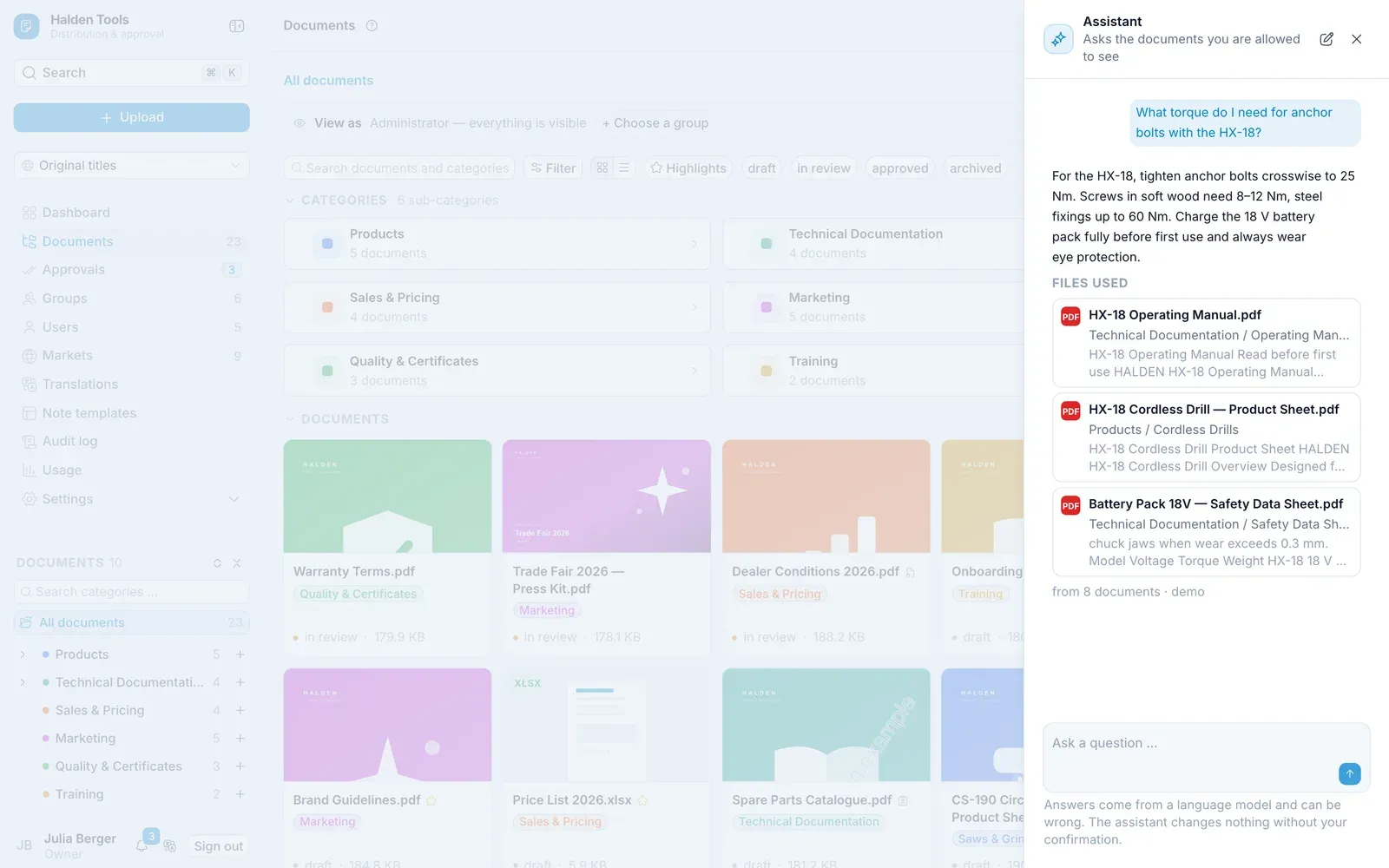
Asking a question
- Click Assistant at the bottom right (on a phone, just its sparkle icon) – or type the question into the command palette (⌘Ctrl K).
- Write the question under Ask a question … and click Ask.
- The sources are listed under Files used. A click opens the document.
With New you start a new conversation.
Questions about using DDM
The assistant also explains how the CMS is used – "How do I give a group access to a category?". The answer then comes from this guide: under From the user guide is the section, and a click opens it in a new tab.
Asking just one document
Open a document and ask from there: the top then shows About "…", and the assistant answers only from this document. With Ask all documents you lift that restriction.
Setting up
Administrators set up the assistant under Settings › AI assistant: provider, model and API key, Test connection, Assistant active. Under Spending limits you cap the costs for the organisation and per person. Answer from the user guide lets the assistant answer questions about using DDM from this guide; matching sections of the guide go to the provider for it, nothing of your organisation's. AI in the note editor switches on the writing aid in notes and templates.